
Co-stardom network 🎬
Introduction
After a movie, my first question always is: “Are the main actors really famous?” and sometimes “Did this pair play in other movies?”. To answer these questions, I created an interactive co-stardom network.
The project is live, have a try!
Description
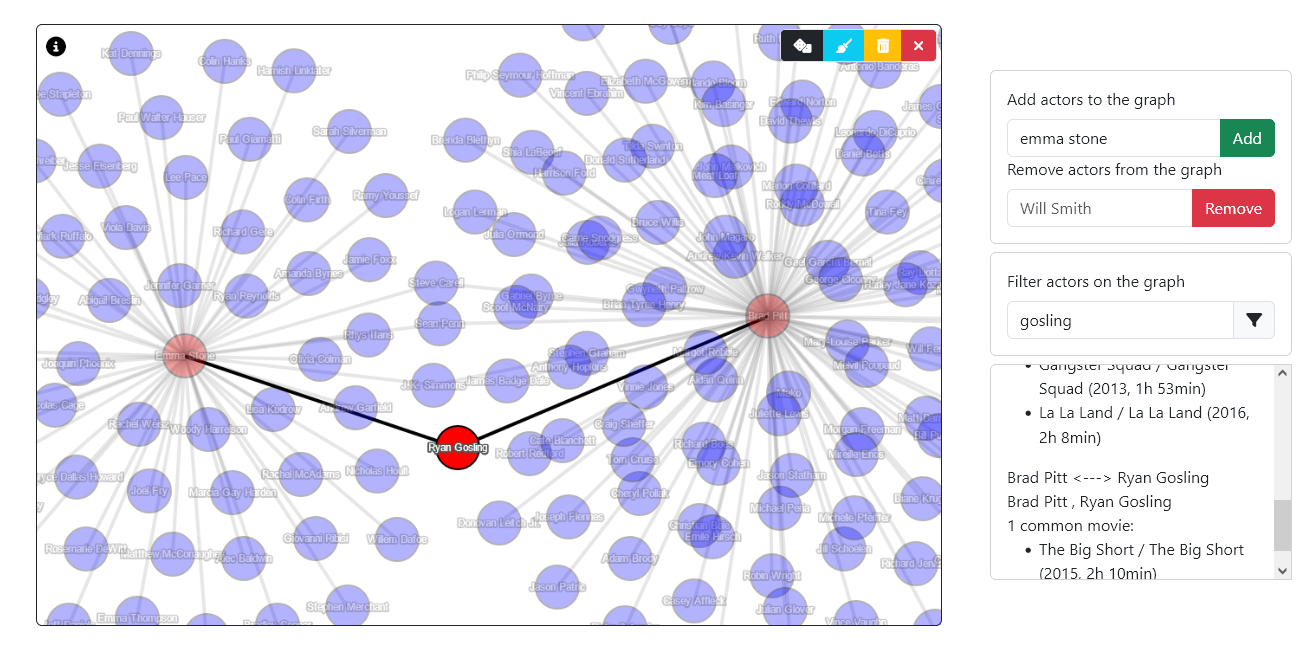
The graph is interactive. Two actors are connected in the network if they both played in at least one movie.
Adding actors
Either search for your favorite actor in the appropriate input field and click Add, or hit to add a random actor.
Selecting actors/relationships
You can click and drag nodes and edges anywhere. A selected node will appear in red and a selected edge in black. Selecting a node reveals the number of connections the actor currently has in the graph, as well as basic personal information on the actor/actress. Selecting an edge reveals the common movies these two actors have. You can select simultaneously multiple nodes and edges with Ctrl/Cmd+click or with a click and drag rectangle box selection while holding Ctrl/Cmd.
Removing actors
Hit to remove everbody from the graph.
Hit to remove the selected actors (those in red).
Hit to clear actors with no relationships in the network.
Alternatively, you can type the actor’s name in the appropriate input field and hit Remove.
Instead of removing an actor, you can filter the view more easily with the automatic filtering text input .
Data source
One major concern is to get a reliable source of data. IMDb provides non-commercial datasets for everyone to use on the form of huge tsv files. For our purpose, we will look at three of these files : title_basics.tsv, name_basics.tsv, title_principals.tsv. These contain respectively : the list of all movies, the list of all actors and the list of casts, i.e. for every impersonation of one actor in a single movie the list of all characters.
The following tables show the first few lines of these files.
| tconst | titleType | primaryTitle | originalTitle | isAdult | startYear | endYear | runtimeMinutes | genres | |
|---|---|---|---|---|---|---|---|---|---|
| 0 | tt0000001 | short | Carmencita | Carmencita | 0 | 1894 | nan | 1 | Documentary,Short |
| 1 | tt0000002 | short | Le clown et ses chiens | Le clown et ses chiens | 0 | 1892 | nan | 5 | Animation,Short |
| 2 | tt0000003 | short | Pauvre Pierrot | Pauvre Pierrot | 0 | 1892 | nan | 4 | Animation,Comedy,Romance |
| 3 | tt0000004 | short | Un bon bock | Un bon bock | 0 | 1892 | nan | 12 | Animation,Short |
| 9 | tt0000010 | short | Leaving the Factory | La sortie de l’usine Lumière à Lyon | 0 | 1895 | nan | 1 | Documentary,Short |
| nconst | primaryName | birthYear | deathYear | primaryProfession |
|---|---|---|---|---|
| nm0000001 | Fred Astaire | 1899 | 1987 | soundtrack,actor,miscellaneous |
| nm0000002 | Lauren Bacall | 1924 | 2014 | actress,soundtrack |
| nm0000003 | Brigitte Bardot | 1934 | nan | actress,soundtrack,music_department |
| nm0000004 | John Belushi | 1949 | 1982 | actor,soundtrack,writer |
| nm0000005 | Ingmar Bergman | 1918 | 2007 | writer,director,actor |
| nm0000006 | Ingrid Bergman | 1915 | 1982 | actress,soundtrack,producer |
| tconst | nconst | category | |
|---|---|---|---|
| 0 | tt0000001 | nm1588970 | self |
| 1 | tt0000001 | nm0005690 | director |
| 2 | tt0000001 | nm0374658 | cinematographer |
| 3 | tt0000002 | nm0721526 | director |
| 4 | tt0000002 | nm1335271 | composer |
| 5 | tt0000003 | nm0721526 | director |
Actors are uniquely identified by the nconst id, while movies are identified with the tconst id. The first two tables provide basic information, while the third one links the two identifiers.
Design choices
Database management system
My first thought was to migrate these files to a SQL database because the data is well structured. Unfortunately, I was not able to create a PostgreSQL database on my machine 💀. This is one of the many issues encountered in real life projects.
So I switched to a graph-based database called Neo4j. The advantage of a graph-based database is that the queries would then be written in an almost natural language. The installation works fine and I was able to define a relational model for the three files to describe the structure of the network. However, the free plan of Neo4j is limited to 200000 nodes, which allows only for a very partial upload of the dataset. Because in this project the completeness of the dataset really matters, I switched to MongoDB for its flexibility and ease of use, which allows to store the full dataset in a document-based database.
Going back to a non-graph-based database is not that much of an issue in our case as I only need one single request: “Find all the other actors a single actor ever played with”. If I were to ask for more complex queries, such as “Find all the other actors at a distance lower than two of a given actor” or “What is the distance (minimum number of connections in the network) between two actors?”, then I would need a graph-based database, as the requests would be absolutely inefficient (and tedious to write) in MongoDB.
User interface
Displaying the whole network seemed a bit daunting at first. With hundreds of thousands of actors, it would be an intricate mesh of nodes and edges and require tremendous computation power on both client-side on server-side. Moreover, we usually are interested in a small portion of the network, so I let the user add the desired actors on its own.
To see the code, head to github.